 Linux on IBM
Netvista 8363Linux on IBM
Netvista 8363
Linux on IBM
Netvista 8363Linux on IBM
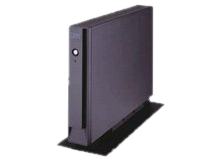
Netvista 8363The Netvista 8363 also refered as N2200 is a thin client made and
sold by IBM between 1999 and
2001. It was designed to operate as a Windows Terminal with Windows CE
3.1 or a Linux based Terminal X. It was declined in 3 versions:
the EXX, TXX and WXX series. The EXX and WXX have an Ethernet
10/100 network interface while the TXX series have a Token Ring
interface. The difference between the EXX and WXX series is that the
WXX is shipped with a 16MB compact flash
card with MS Windows CE 3.1 installed.
The interesting points of the Netvista 2200 are that theese thin
clients are nearly a standard PC architecture (at the BIOS near), that
they are small ( l x L x H = 3.6 cm x 28 cm x 20 cm ). They are low
power consummer (max 3A under 12V ) and total silents.
Theese PC are now discontinuated but you can buy it for about 20€.


processor	: 0
vendor_id	: CyrixInstead
cpu family	: 5
model		: 7
model name	: Cyrix MediaGXtm MMXtm Enhanced
stepping	: 4
cpu MHz		: 233.867
cache size	: 16 KB
fdiv_bug	: no
hlt_bug		: no
f00f_bug	: no
coma_bug	: no
fpu		: yes
fpu_exception	: yes
cpuid level	: 2
wp		: yes
flags		: fpu tsc msr cx8 cmov mmx cxmmx
bogomips	: 466.94
Here, we can see that the processor is an i586 (cpu_family: 5) from Cyrix clocked at 233 Mhz. Unfortunatly it haves only 16 KB cache. It honors a Floating Point Unit (even if the Cyrix FPU was not very reputed) and the MMX instructions set.
Then we will look at the installed PCI devices (all the PCI hardware
are soldered on the main board thus not removable/interchangeable )
reading
in /proc/pci :
PCI devices found:
  Bus  0, device   0, function  0:
    Host bridge: Cyrix Corporation PCI Master (rev 0).
  Bus  0, device  14, function  0:
    Ethernet controller: Silicon Integrated Systems [SiS] SiS900 10/100 Ethernet (rev 2).
      IRQ 10.
      Master Capable.  Latency=64.  Min Gnt=52.Max Lat=11.
      I/O at 0xc000 [0xc0ff].
      Non-prefetchable 32 bit memory at 0x44801000 [0x44801fff].
  Bus  0, device  18, function  0:
    ISA bridge: Cyrix Corporation 5530 Legacy [Kahlua] (rev 0).
  Bus  0, device  18, function  1:
    Bridge: Cyrix Corporation 5530 SMI [Kahlua] (rev 0).
      Non-prefetchable 32 bit memory at 0x40012000 [0x400120ff].
  Bus  0, device  18, function  2:
    IDE interface: Cyrix Corporation 5530 IDE [Kahlua] (rev 0).
      I/O at 0xfc00 [0xfc0f].
  Bus  0, device  18, function  3:
    Multimedia audio controller: Cyrix Corporation 5530 Audio [Kahlua] (rev 0).
      Non-prefetchable 32 bit memory at 0x40011000 [0x4001107f].
  Bus  0, device  18, function  4:
    VGA compatible controller: Cyrix Corporation 5530 Video [Kahlua] (rev 0).
      Non-prefetchable 32 bit memory at 0x40800000 [0x40ffffff].
  Bus  0, device  19, function  0:
    USB Controller: Compaq Computer Corporation ZFMicro Chipset USB (rev 6).
      IRQ 11.
      Master Capable.  Latency=64.  Max Lat=80.
      Non-prefetchable 32 bit memory at 0x44800000 [0x44800fff].
We can notice that the Netvista embbed one IDE controler, one SiS 900 10/100 Ethernet Controler, One Compaq USB host controler, one Cyrix integrated Video Adaptater and one Cyrix integrated SoundCard.
We will describe 3 linux installations possibilities:
You need a compatible Compact Flash Card of a size depending on what
you want to install.
$ wget http://kernel.org/pub/linux/kernel/v2.4/linux-2.4.32.tar.bz2
$ tar jxvf linux-2.4.32.tar.bz2
$ cd linux-2.4.32
$ wget netvista-cmdline.patch
$ patch -p1 < netvista-cmdline.patch
$ make menuconfig
$ make dep
$ make vmlinux
You need the version with a Compact Flash socket
1.- Kernel compilation
2.- LTSP Linux Terminal Serer Project